One of the clients BrazilDesk worked with in 2024 was a small company, but one with a highly complex knowledge base, processes that changed every week, and, as a result, high turnover among support agents.
This company had its training recorded on video, but nothing structured. It was basically one person handling the tech side, throwing out a million pieces of information per minute in a video that ran almost two hours long.
Over time, I noticed this company did everything in a rush, and whenever they hired a new agent, there was simply no onboarding process in place. The new hire had to sink or swim just to keep up with the team.
One of the things that constantly drags a company into chaos, whether small, medium, or large, is poorly defined internal processes. Solid onboarding and well-structured training are what make a company successful.
Today, with so many tools on the market, there are training and course platforms your company can use to avoid these kinds of problems on the support team.
In this article, we will walk through the simplest solutions for less complex businesses first, then work our way up.
Basic Onboarding and Training
If your support operation is not very complex, you do not need anything fancy, just something well organized. A tool where your agents can access SOPs, processes, access credentials, small modules, and a few tutorial videos is enough.
The idea here is to keep the documentation lean, organized in a logical order, and up to date.
In this scenario, there is no need for exercises, tests, certificates, or grading like a school. It is introductory content, plain and simple.
Tools
The best tools are the ones that are easy to access and share, where you can keep your documents and files in one place.

Notion: even the free version is enough to put together your agent’s entire onboarding and training. Agents do not even need an account to access the material. What is great about Notion is that you can create pages and embed videos, PDFs, documents, and more.
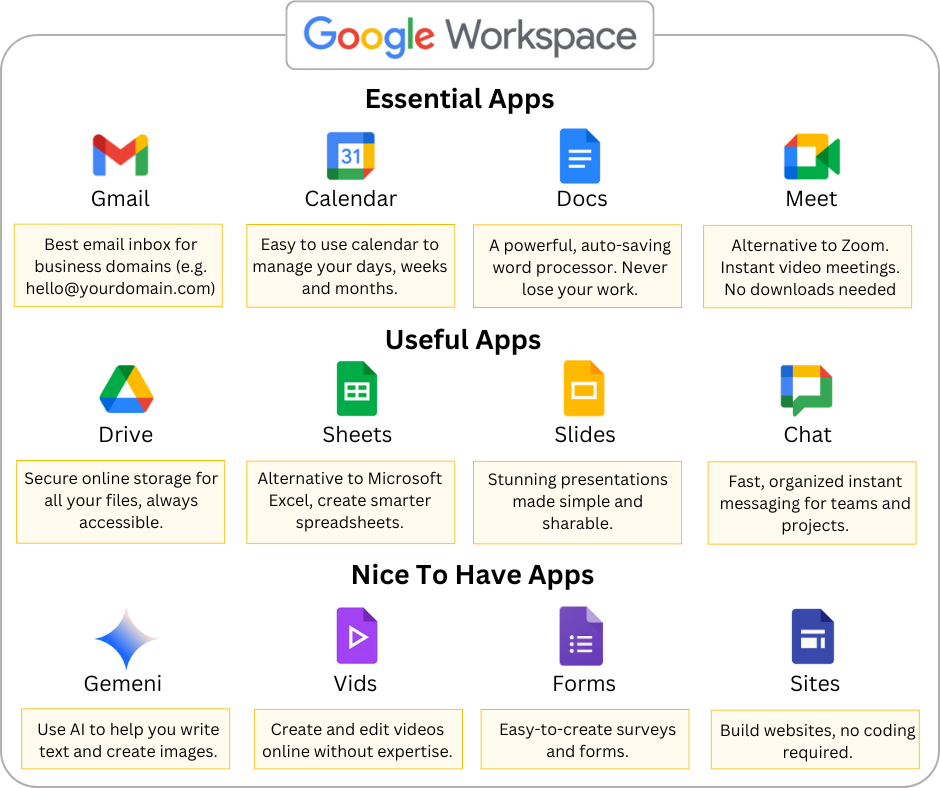
Google Workspace: Google Drive recently added a feature called “Projects,” where you can group documents, folders, and files together, and agents can chat with Gemini AI right there to get their questions answered. It also works great as a knowledge base. With Google Workspace, you get several tools for building training material: docs, slides, videos, and more. The tip here is to keep everything as organized as possible.
Ongoing Training (Mid-Size Companies)
This is where the client I mentioned at the start of the article fits in perfectly. Even though that company is not technically mid-size, it is a small company with onboarding and training needs closer to those of a much bigger one, simply because of its level of complexity.
The idea here is to build training in a course format: more structured, with lesson progression, feedback, and exercises.
So on top of the basic documentation we covered in the first example, this is where LMS features come in, and there are tools built specifically for that.

Google Classroom: still a Google Workspace tool, but a bit more developed than just using Drive. As the name suggests, Google Classroom gives you an environment where you can set up a course or subject, build modules with content, assign work for agents to complete, grade it right inside the platform, and even build simple quizzes.

LearnDash: if you already have a WordPress site, a plugin like LearnDash takes your training to another level. You can build more complex quizzes than in Google Classroom, get much more control over users and admins, and access far more settings for training that runs on a schedule or needs groups and tighter organization. LearnDash also supports completion certificates, which can be a great perk for company employees. Using LearnDash is not hard. Check out this LearnDash guide for begginers.
Enterprise-Level Training
Here we are talking about a much higher level of complexity and a much larger number of learners, for truly large companies. In this scenario, companies need the infrastructure to train hundreds of agents while staying compliant and building out internal career paths. That means full learning tracks, certifications, and AI-driven training.
For this kind of complex, corporate-level training, there are a few solid options:

WordPress: yes, WordPress makes the list again. Beyond letting you use plugins like LearnDash for something more advanced but still not overly complex, WordPress can become a true all-in-one platform, which makes it a solid pick for companies that want a custom LMS. By combining plugins, you can gamify training, build a fully themed environment, and connect several integrations right inside the platform, including AI.
The interesting part is that most of this can be done with plugins and configuration, no coding required at first, though custom code is always an option and adds another layer of possibilities. For companies with a large user base, it is important to make sure the platform is built with accessibility in mind, follows LGPD (or the equivalent data privacy law in your country), and runs on solid hosting so it does not get overloaded.
Absorb LMS or Docebo: these are SaaS platforms built for enterprise training, covering onboarding, employee upskilling, compliance training, customer education, and more. With these platforms, you pay a fixed price per user and everything is hosted and maintained for you, with no servers to set up.
They offer strong support for SCORM and xAPI, plus native AI for suggesting learning paths. Since these are already well-built, robust platforms, you do not need to install add-ons and plugins the way you would with WordPress. The core features are already there, ready to use.
So, what kind of training does your team actually need? Something simple with light material and easy onboarding (Notion)? Something simple with a bit more structure (Google Classroom)? Something fully custom, built to order (WordPress)? Or something enterprise-ready, already built for the job (Absorb LMS)?